
Hospitals don’t patch first and hope for the best. I’d sum it up like this: they triage risk, get emergency sign-off, test a small set of clinical workflows, roll out in waves, and keep rollback and downtime steps ready the whole time.
If I had to boil the article down into the main steps, it’s this:
- Confirm it’s a true emergency with a risk matrix, not just a high-priority update
- Define scope and owners across security, IT, biomed, and clinical teams
- Approve through an emergency change path with named sign-off and stop rules
- Test in a clinical context so login, barcoding, HL7, PACS, alarms, and device links still work
- Start with a canary group before patching broader production systems
- Deploy in stages using rings or clustered node-by-node updates to keep care systems up
- Watch live technical and clinical signals during each wave
- Prepare downtime fallbacks and rollback triggers before the first change starts
- Verify patch success for 24–72 hours and document approvals, exceptions, and residual risk for audit review
What stood out to me is that this is not just an IT task. It’s a patient care issue. The article makes that clear with hard examples, like lab delays during EHR downtime (62%) and medication issues in 25.5% of downtime reports. That’s why hospitals tie patch decisions to both cyber risk and care impact.
Here’s the short version of the workflow:
| Stage | What I’d focus on |
|---|---|
| Emergency check | Is there active exploitation, PHI risk, or device/patient care exposure? |
| Scope and ownership | Which systems, units, and teams are involved? |
| Approval | Who signs off, and what stops the change if things go wrong? |
| Testing | Do core care workflows still function after the patch? |
| Pilot | Does a canary group stay stable under use? |
| Rollout | Can I patch in waves without taking services down? |
| Monitoring | Are latency, queue depth, logins, alarms, and clinician reports still in range? |
| Rollback and records | Can I reverse fast, and is every decision logged? |
So if you’re looking for the direct answer: hospitals avoid downtime during emergency patching by treating the patch like a controlled clinical change, not just a technical fix. The rest of the article walks through that process from start to finish.
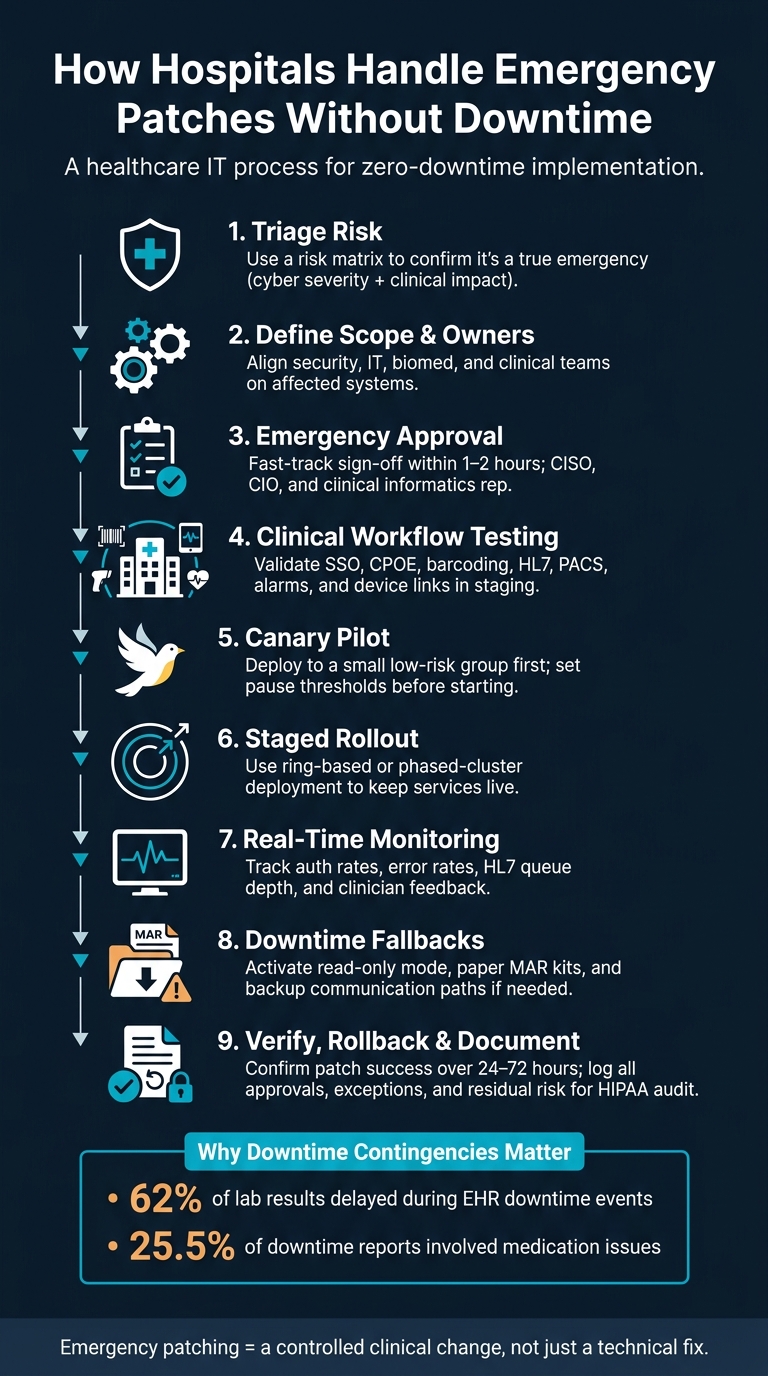
How Hospitals Patch Systems Without Downtime: 9-Step Emergency Process
1. Triage Risk and Activate Emergency Change Approval
Rank the Patch by Cyber Risk and Clinical Impact
Once scope and ownership are clear, the next step is fast risk triage and emergency approval. The team ranks the patch using two factors: cyber risk severity and clinical impact severity, often leveraging Censinet RiskOps for healthcare to coordinate these assessments.
Cyber risk comes down to things like active exploitation, internet exposure, and access to PHI or identity systems. Clinical impact is about patient care: does the asset support urgent care, or can staff switch to manual workflows for a short time without creating unsafe conditions?
For example, a remotely exploitable, internet-facing VPN gateway that supports telehealth or radiology reads belongs in the Critical tier. Some hospitals spell this out in policy with hard deadlines, such as patching assets with critical clinical impact and high cyber risk within 24 hours.
After the tier is assigned, the team sends the change through the emergency approval path.
If patching has to wait - say, for a legacy medical device that still lacks a vendor-approved patch - the team puts compensating controls in place. That usually means:
- Network segmentation
- Restricted access
- Increased monitoring
- A documented exception with a target remediation date
Use a Fast-Track Approval Path With Clear Sign-Off
Emergency change speeds up governance, but it doesn't remove it. A pre-approved group makes the decision, usually the CISO or deputy, the CIO or infrastructure lead, and a clinical informatics representative. The call is usually made within 1–2 hours, then logged in the ITSM system with timestamps, affected assets, and the emergency rationale.[3][4]
Any system tied to direct patient care - EHR modules, pharmacy systems, imaging, or bedside monitors - needs clinical sign-off. The CMIO, nursing informatics lead, or ED medical director reviews the change summary, timing, and contingency plan. Their approval is recorded with name, role, and timestamp.
The change record should also spell out stop criteria. In plain terms: what would make the team hit pause right away? That can include downtime, error spikes, or clinician-reported issues. HHS guidance backs this up and says that even in urgent situations, exceptions to patch policy should be approved in writing and kept audit-ready.[5]
Routine Patching vs. Emergency Patching: Key Differences
Routine patching and emergency patching are not the same thing. The main differences show up in speed, scope, and documentation.
| Aspect | Routine Patching | Emergency Patching |
|---|---|---|
| Approval speed | Scheduled CAB review (days to weeks) | On-call fast-track approvers (hours) |
| Testing depth | Full non-production testing, staged pilots | Targeted testing of critical workflows due to time pressure |
| Maintenance timing | Planned low-volume windows (nights/weekends) | As soon as safely possible, sometimes during business hours |
| Rollout scope | Broad, staged across all affected assets | Most exposed or critical assets first; others follow |
| Documentation focus | Full technical records and test results | Timestamped risk justification, clinical sign-off, exception handling |
| Post-change review | Standard change closure | Mandatory after-action review |
HHS defines an emergency system change as one that must happen immediately because of system unavailability or an imminent outage. It also says emergency changes should be few and far between and followed by an after-action review.[3]
Emergency change is a controlled exception, not the default path. If a team keeps relying on it, that's usually a sign the routine patching program needs work.
sbb-itb-535baee
2. Test the Patch in a Clinical Context Before Full Rollout
An emergency patch still needs testing. If you skip validation, you can throw bedside work off in the middle of a shift. After approval, test the patch in a clinical setting before you push it out at scale.
Test Critical Workflows and Integrations
Basic server checks won't catch clinical failures. A system can look fine on paper and still fail where it matters most: broken barcoding, dropped HL7 messages, or decision support that suddenly stops firing.
Run focused tests in a staging environment that mirrors production, including the same identity, interface, and network segmentation layers. Put the most important workflows first:
- Authentication: Physicians, nurses, and pharmacists logging in through SSO and badge tap-in, especially during simulated shift-change volume
- Order entry and medication administration: CPOE, eMAR access, bedside barcode scanning, and pharmacy verification queues
- Alarms and clinical decision support: Drug-drug and drug-allergy interaction alerts, telemetry feeds, and critical result routing
- Integrations: Lab orders moving through the interface engine, imaging orders reaching PACS, and results returning to the EHR
- Device connectivity: Vital signs monitors, infusion pumps, and ventilators sending data into monitoring systems [7]
Bring in clinical champions too - nurse leaders, physician informaticists, or pharmacy leads. They often spot workflow problems that synthetic tests miss [7].
Start With a Pilot or Canary Group
Once staging checks out, move to a small canary group first [6][7].
Good first-wave targets include administrative workstations, one application cluster behind a load balancer, or a lower-acuity unit such as an ambulatory clinic or step-down unit where clinical champions are already involved. Use real clinicians during this step, and watch logs, interface queues, and help desk tickets for anything out of line [6].
Set your pause thresholds before the canary starts. If login times climb past your accepted limit, barcoding fails above a set error rate, or alarm routing starts acting inconsistently, stop the patch there - don't expand it [6][7]. The canary group is your go/no-go point. It tells you whether to move forward, pause, or roll back.
Use Censinet RiskOps™ to pick representative, lower-impact assets for the canary group. Then use the canary results to set thresholds for the next rollout stage.
3. Deploy in Stages to Keep Services Available During Patient Care
Once the canary checks out, the next step is to expand in production waves. The aim is simple: keep critical services up while the patch moves through production. To do that, teams need to be deliberate about sequence, timing, and the mechanics that keep traffic moving.
Rollout Methods That Keep Services Running
After canary validation, hospitals usually expand with ring-based or phased-cluster rollouts.
| Method | Scope | Speed | Safety | Best For |
|---|---|---|---|---|
| Ring-based | Groups of units ordered by criticality | Medium | High | Patches touching ED, ICU, or pharmacy systems |
| Phased cluster | Nodes in a redundant cluster, one at a time | Fast | High, with robust redundancy | Clustered databases, interface engines, PACS |
For phased cluster updates, the process is straightforward: drain active connections from one node, apply the patch, run quick functional checks, return that node to service, and then move to the next one. Load balancers reroute traffic during the handoff, which helps preserve access to chart review and order entry while teams verify each patched node. This approach fits especially well for active-active EHR clusters and mirrored PACS.
Ring-based deployment adds a patient-care priority layer. IT staff and super-users go first. Then come lower-risk areas, such as ambulatory clinics or step-down floors. High-dependency areas like the ED and ICU come later. Each ring should open only after the prior ring hits stability thresholds: no critical incidents, latency within limits, and empty interface queues.
Monitor Clinical and Technical Signals in Real Time
During each deployment wave, watch both system metrics and front-line feedback.
On the technical side, track authentication success rates, server error rates, database query times, HL7 message processing times, and interface queue depth. Alert thresholds should match clinical tolerances. For example, if order-entry response time creeps past a few seconds, that should trigger an immediate escalation because delays at that point can affect medication administration timing.
On the clinical side, assign clinical champions in the ED, ICU, med-surg, and OR to test workflows during each wave. That means placing orders, documenting notes, administering medications, and reviewing imaging results. Give them a direct line back to IT, whether that's a dedicated hotline, a secure messaging group, or a tagged incident queue. Incident tickets should link to the specific patch wave so teams can line up clinician reports with technical events in the same moment. Short check-in huddles at key rollout points can also surface issues that never show up on a dashboard.
Those signals should drive the next move: advance, pause, or roll back the current wave.
Plan for Downtime Contingencies Even When the Goal Is Zero Downtime
Even a staged rollout that looks solid on paper can run into trouble. Downtime contingencies need to be ready before deployment begins.
Read-only access is the first fallback. Viewer-only modes can let clinicians see existing charts, active orders, and recent results even if documentation or order entry is temporarily down. Units should also have downtime kits ready to go, including paper medication administration records, vital signs flowsheets, admission notes, and laminated quick-reference guides for staff who may be rusty with manual steps. During EHR downtime events, 62% of lab results were delayed and 25.5% of downtime reports involved medication issues [8], which is a strong reminder that backup workflows need to be specific and practiced, not just sitting in a binder.
Backup communication paths matter just as much as paper forms. Overhead paging, secure messaging apps, and unit-level contact trees help keep time-sensitive information moving, including stat lab results, bed assignments, and code calls, even when electronic systems are degraded. Set these paths ahead of time, assign unit-level owners, and make sure the on-call clinical informatics contact is reachable for the full deployment window. Any use of downtime fallback should be recorded in the same change ticket for verification.
4. Verify Results, Prepare Rollback, and Document for Auditability
Confirm Patch Success and Service Integrity
After the final wave settles down, shift from watching the rollout to formal verification. Make sure the patched version or build is installed on every in-scope system, including EHR, PACS, medication dispensing units, and networked medical devices. Then check that services came back up cleanly and that no critical errors keep repeating in application, system, or security logs.
Next, verify end-to-end data flow across HL7, FHIR, DICOM, and device telemetry.
The immediate post-patch window isn't enough. Problems often show up later, once normal U.S. patient volume returns during peak clinical hours and overnight batch jobs start running. Keep elevated monitoring in place for 24–72 hours and compare response times and failure rates against pre-patch baselines. [1][2]
Keep Rollback Assets and Decision Thresholds Ready
If validation fails, rollback needs to happen fast. That readiness should be confirmed before the first patch wave begins. In plain terms, you need current database backups, pre-patch VM snapshots, and stored configuration baselines in a controlled repository. For medical devices, that also means vendor-approved downgrade steps and recovery media that are documented and easy for clinical engineering to access. [10][11][12][13]
Rollback should not depend on gut feel. Set explicit triggers in the change record, such as:
- A sustained transaction failure rate above 2% in the EHR
- Interface queues growing past safe depth
- Infusion pump alarms failing to fire
- A spike in similar help desk tickets from multiple units in a short period
These thresholds need sign-off from clinical leadership so they match actual risk in the ED, ICU, and OR, not just what feels acceptable to IT. [10][11][14][15] If a threshold is crossed, the rollback call should be shared by a pre-assigned system owner and clinical owner, with one bridge line connecting IT, clinical engineering, and unit representatives.
Document Approvals, Exceptions, and Follow-Up Actions
Once rollback paths are in place, document the full decision trail. Every emergency patch needs a complete change record. Record the trigger, rationale, timing, affected systems, approvers, verification evidence, rollback actions, and residual risk. Attach monitoring screenshots and summaries of feedback from key departments. [9][14][16]
Residual risk should be logged on its own. If a workaround is still active or a vendor fix is still pending, say that directly and include a target resolution date. This matters for HIPAA Audit Controls (45 CFR 164.312(b)), OCR investigations, and cyber insurance underwriting. Those reviews depend on being able to trace who approved the change, what changed, what was checked, and what risk still remains. [16]
For distributed health systems, Censinet RiskOps™ can centralize change records, approvals, compensating controls, and remediation evidence across IT security, clinical engineering, and operations.
FAQs
What counts as a true patch emergency?
A true patch emergency comes down to two things: how severe the threat is and how much it could affect patient safety. In most cases, that means zero-day exploits or vulnerabilities with a CVSS score of 9.0 to 10.0 that put systems at immediate risk.
When that happens, teams usually need to move fast through an emergency patching lane instead of waiting for normal change windows. The goal is to cut risk within 24 to 72 hours. Device criticality, network exposure, and whether the exploit is already active also shape the response.
How do hospitals test patches without risking care?
Hospitals test changes in tightly controlled environments that mirror production. That usually means the same clinical interfaces, databases, and connected devices, including barcode scanners. To run those tests without putting patient privacy at risk, teams use synthetic or masked data to simulate day-to-day workflows without exposing protected health information.
Validation usually covers regression, integration, and performance testing. Many hospitals also roll changes out in phases, starting with pilot groups or noncritical systems, then watching results for 24 to 72 hours before moving to a broader release. And they don't go in blind - rollback plans are always prepared.
When should a hospital pause or roll back?
A hospital should pause an update - or roll it back - if it starts causing problems that put system uptime or patient safety at risk.
Downtime in a hospital isn't just an IT issue. It's a patient safety emergency. That's why teams need clear rollback steps before they apply any patch. If a deployment creates new problems, they should be able to reverse the change fast and get systems back to a stable state.
