
If you handle DoD-linked CUI in healthcare, the clock is ticking: by November 10, 2026, many organizations will need a C3PAO-issued CMMC Level 2 certification.
If I had to sum up the article in a few lines, I’d say this: HIPAA is not enough, scope comes first, and readiness depends on proof, not just policies. The article walks through four core steps: define the CUI boundary, test each of the 110 NIST SP 800-171 controls, fix gaps based on risk to data and patient care, and build an evidence package before the formal review.
Here’s the article in plain English:
- Step 1: I identify which contracts, systems, users, devices, and vendors touch CUI or FCI
- Step 2: I compare the live setup against CMMC Level 2 control requirements and check proof like logs, MFA settings, scans, and incident records
- Step 3: I fix the highest-risk gaps first, such as weak remote access, poor segmentation, stale accounts, and backup failures
- Step 4: I run a mock review, organize the SSP and POA&M, and keep monitoring so the setup does not drift
A few points stand out. First, healthcare scope can spread fast. EHRs, PACS, lab systems, telehealth tools, medical devices, and third-party vendor connections can all fall into review scope if they touch DoD-related CUI. Second, the article makes clear that shared workstations, old medical devices, and vendor remote access are common weak spots. Third, it ties remediation to both data risk and patient safety, which is where healthcare teams often need the most focus.
The main takeaway: a CMMC readiness assessment is a dry run that helps me find scope issues, missing evidence, and control failures before the formal assessment does.
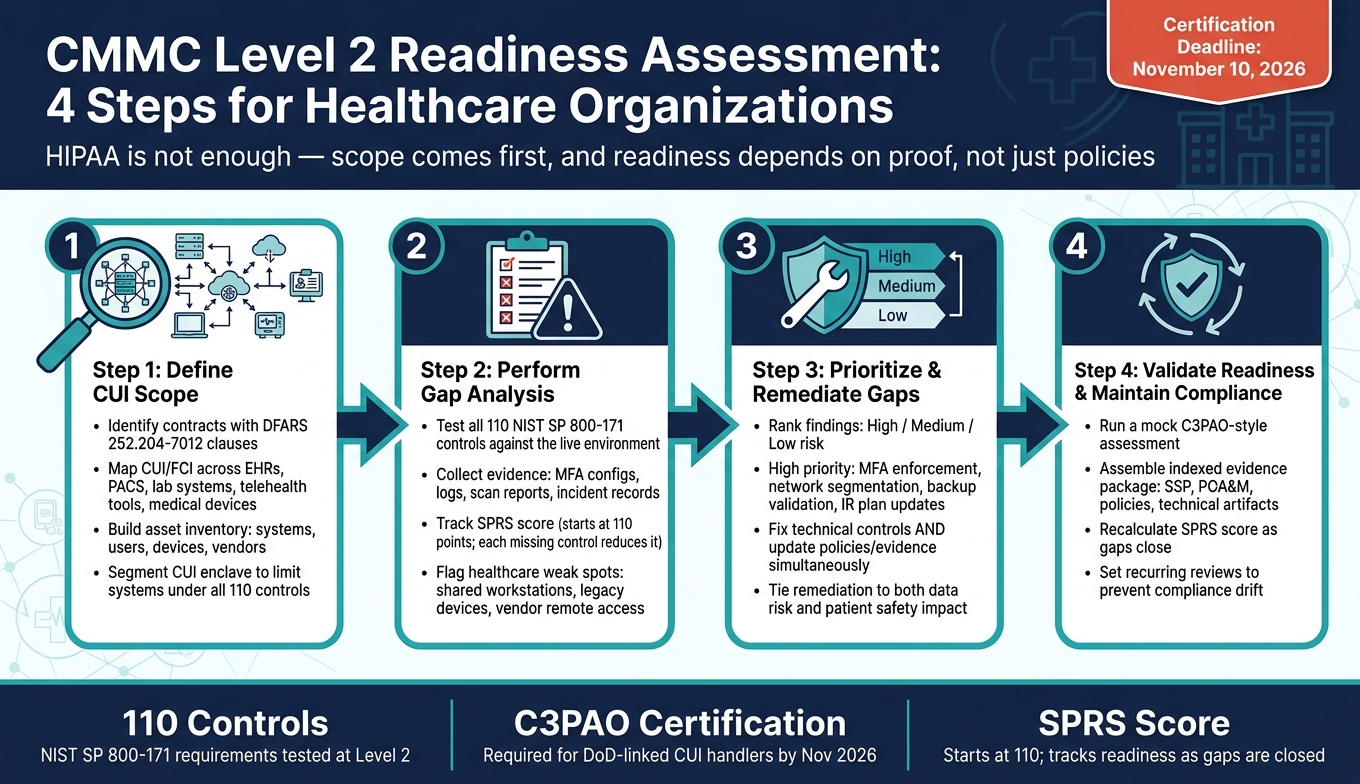
CMMC Level 2 Readiness Assessment: 4 Steps for Healthcare Organizations
How to Prepare for Your CMMC Level 2 Assessment
sbb-itb-535baee
Step 1: Define scope, systems, and data in the CUI environment
Start by setting the CUI boundary for the systems and data tied to DoD work. Review active contracts, solicitations, and subcontracts for clauses such as DFARS 252.204-7012, which trigger CUI safeguarding requirements [1]. Then pull in contracting, legal, and security teams to confirm whether the agreement involves Federal Contract Information (FCI) or Controlled Unclassified Information (CUI) [3]. The contract language should drive the exact assessment scope.
A segmented CUI enclave can make this much easier. By isolating the CUI environment, you keep the number of systems subject to all 110 NIST SP 800-171 controls under control. That also helps lower assessment complexity and cost [3][5].
Map where CUI, FCI, and related PHI move across healthcare workflows
Map where CUI and FCI move across healthcare workflows. In healthcare, that usually means looking closely at EHRs, imaging systems like PACS, lab information systems, research platforms, and telehealth tools. If ePHI is produced for or used in a DoD contract, it may be marked as CUI, which can pull those systems into scope [3].
The table below shows common areas where CMMC scope can expand in healthcare:
| Scoping Category | Healthcare Examples | Scope Notes |
|---|---|---|
| Clinical Systems | EHRs, imaging (PACS), lab information systems | Often store or process CUI-related PHI |
| Medical Devices | Diagnostics, therapeutics, connected monitors | May require isolation if they run unsupported OSs |
| Administrative | Billing, TRICARE administration, file shares | May process FCI or CUI |
| Endpoints | Laptops, mobile devices, telehealth tablets | Scope expands if they are permitted to access CUI |
| External Services | Cloud EHRs, MSPs, research subcontractors | Must be checked for FedRAMP authorization and shared responsibility models |
Review every vendor in the CUI environment for authorization and shared responsibility as part of your third-party vendor risk management. If a vendor handles CUI on your behalf and is not covered by the needed flow-down clauses, that is a compliance gap before the assessment even starts [5]. This vendor inventory becomes the baseline for your gap analysis in Step 2. Utilizing enterprise assessments can help streamline this data collection across the organization.
Build the asset and responsibility inventory for the assessment
Build a full inventory of in-scope systems, users, devices, applications, and vendors. Include privileged accounts, clinical staff, researchers, and vendor personnel with access to the CUI environment [4][2].
Pair that inventory with network diagrams, data flow maps, and an SSP that explains how CUI moves through the environment [3][1].
Before Step 2, assign ownership across security, compliance, clinical engineering, and vendor management.
Step 2: Perform the gap analysis against CMMC practices
Use your inventory and data-flow maps to check each NIST SP 800-171 control against the live environment, not just policy documents. Assessors want proof that controls work in day-to-day use. So this step turns your Step 1 inventory into a hands-on check of what’s in place.
Review controls by domain using evidence from live operations
Pull evidence from live operations: MFA settings, session timeout settings, deprovisioning records, logs, and tabletop results. Talk with clinical and IT staff about incident reporting, access reviews, and offboarding.
Here’s a simple map of key control domains and the proof to gather:
| Control Domain | Evidence to Collect from Live Operations |
|---|---|
| Access Control | MFA configurations, session timeout settings, records of timely account deprovisioning, and administrative session recordings |
| Incident Response | Incident response plans, tabletop exercise after-action reports, and documented notification pathways |
| Risk Management | Asset inventories, data flow maps showing CUI/PHI movement, and a risk register prioritizing patient care impact |
| Security Assessment | Vulnerability scan reports, penetration test results, and configuration baselines |
| System Protection | Encryption validation for data at rest and in transit, network segmentation rules, and DNS protection logs |
| Audit & Logging | Centralized logs, alerting configurations, and evidence of time synchronization across the enclave |
Track your SPRS score as you close gaps. You start at 110 points. Each missing requirement lowers that score and affects readiness [6].
As you review results, split minor paperwork issues from control failures that need fixes. That distinction matters. A missing document is one thing; a control that doesn’t work in practice is another.
Focus on healthcare-specific weak points that often create gaps
Healthcare settings come with risks that many other sectors don’t face at the same level. Shared clinical workstations are a common trouble spot. When several staff members use the same machine without session timeouts or separate authentication, access control gaps are almost certain. Legacy medical devices can be just as hard to deal with. Many run unsupported operating systems and can’t use modern security agents or encryption. Put those systems in the risk register and isolate them with segmentation [3].
Vendor remote access is another weak point. Maintenance connections from medical device makers or IT providers often lack session recording or strong cryptography. Require MFA, strong cryptography, and session recording for all remote access [3].
Centralize logs across clinical, device, and admin systems. If the enclave can’t show a single timestamped audit trail, treat that as a gap.
Document findings in an SSP and preliminary POA&M
Record each control in the SSP as implemented, partial, or missing. Then use the POA&M to assign owners, action items, and due dates. Tie each control to both policy and operational evidence, so you can show intent and execution [3].
These findings become the remediation plan in Step 3.
Step 3: Prioritize remediation and prepare for validation
Use the SSP and POA&M to line up fixes based on risk and day-to-day impact. The point is to get the CUI environment ready for validation, not just to log gaps on paper. Start with the issues most likely to fail an assessment or affect patient care.
Rank remediation by risk to CUI, PHI, and patient safety
Group POA&M findings into three tiers: high, medium, and low risk. High-risk items are the ones that directly expose CUI or PHI, disrupt care, or block readiness. That includes weak or missing MFA on privileged accounts, CUI moving through the same network paths as general clinical traffic, vendor remote access with no monitoring, and untested backups for critical systems.
Medium-risk items usually make it harder to see problems or respond in time. Low-risk items tend to be documentation gaps.
Put your energy first into the fixes that cut the most risk to CUI, PHI, and patient safety.
Close gaps with technical, policy, and process changes
Fix the control, then update the policy, procedure, and evidence at the same time. If you make a technical change but leave the paperwork behind, assessors won't see the proof they need in an evidence-based assessment.
On the technical side, focus first on:
- Network segmentation to isolate the CUI enclave from general clinical traffic
- MFA across all privileged and remote access points
- Centralized logging with the right retention
- Backup testing to confirm that critical systems can be restored
On the policy, procedure, and control side, update incident response steps for healthcare events like EHR outages, medical device anomalies, and ransomware that affects patient care. Use prior tabletop findings to fix gaps in the playbook, escalation path, and training records. Then update workforce training so it covers CUI handling standards and includes dated rosters.
Use the table below to separate immediate fixes from lower-priority cleanup.
| Remediation Category | Priority | Key Actions | Evidence to Produce |
|---|---|---|---|
| Access Control | High | Enforce MFA; apply least privilege; deprovision stale accounts | Config screenshots, deprovisioning tickets |
| Incident Response | High | Update IR plans; use tabletop results to close playbook gaps | After-action reports, updated playbooks |
| Network Segmentation | High | Isolate CUI enclave from clinical traffic | Network diagrams, firewall rule exports |
| Backup Validation | High | Test and document restoration of critical systems | Restoration test records, dated logs |
| Logging & Monitoring | Medium | Centralize logs; set retention policies; configure alerting | Log samples, retention policy docs |
| Workforce Training | Ongoing | CUI handling, phishing simulations | Signed training rosters, completion records |
Use Censinet to support healthcare risk assessment and remediation tracking
Use Censinet RiskOps™ to track third-party risk, remediation actions, and supporting evidence across clinical applications, medical devices, and supply chains. That helps keep remediation evidence organized for the readiness review.
Step 4: Validate readiness, assemble evidence, and maintain compliance
Use the remediation evidence from Step 3 to confirm that the fixed controls still work the way they should.
Run a mock assessment and build the evidence package
Run a mock assessment that mirrors the formal C3PAO review. Then pull the evidence into a format an assessor can trace without digging around.
The point of the mock assessment is simple: check that remediated controls still hold up under assessor-style questions. Your subject-matter experts (SMEs) should be briefed ahead of time so they can walk through system screenshots, access logs, and live workflow demos if asked.
Re-test every remediated control. Pay close attention to healthcare-specific boundaries, especially the segmentation between the CUI enclave and the broader clinical network. That line matters. If it’s blurry, the review can get messy fast.
Pause major configuration changes before the mock assessment. That way, the evidence matches the environment being assessed.
Then assemble the results in a package a C3PAO can follow quickly. The evidence package should be indexed and cross-referenced. A control matrix helps connect each requirement to its owner and the supporting evidence. Include these items in one indexed package:
- SSP
- POA&M
- Policies
- Technical artifacts
- Operational records
- Third-party evidence
Track continuous monitoring after the readiness assessment
Once the mock assessment is done, keep those same control checks running as part of day-to-day operations.
Compliance drift happens more easily than teams expect. New devices show up. Vendors change. Staff turns over. Bit by bit, the environment shifts between reviews.
Set recurring reviews, update the SSP and POA&M when scope changes, and recalculate the SPRS score as issues close. Keep reviews, evidence, and scope updates in sync with operational changes.
FAQs
Does HIPAA compliance help with CMMC Level 2?
HIPAA compliance is a good starting point, but it does not meet CMMC Level 2 on its own.
CMMC Level 2 calls for 110 practices tied to NIST SP 800-171. It also asks for more detailed controls, documentation, and day-to-day proof than HIPAA usually requires.
So even if your organization already follows HIPAA, you still need a gap analysis to compare your current security posture against CMMC requirements.
What systems should we scope for CMMC first?
Start with the systems that handle, store, or transmit CUI or FCI. You should also include Security Protection Assets like Active Directory, VPNs, firewalls, and vulnerability scanners.
To keep scope, cost, and day-to-day work under control, set up a dedicated enclave. Your inventory should cover more than just laptops and servers. It also needs to include software, medical devices, research systems, and third-party vendor portals that touch federal data.
What evidence will a C3PAO expect to see?
A C3PAO will want proof that your security controls aren’t just written down - they’re also working day to day.
That means assessors look for clear, traceable links between your policies, your system settings, and each CMMC requirement. If those links are weak or hard to follow, the review gets harder fast.
Typical evidence includes your SSP, POA&M, Incident Response Plan, system screenshots, audit logs, configuration baselines, incident response exercise records, and proof of personnel training.
