
If cyber systems fail in the ED or EMS, patient care has to keep moving safely. That is the main point.
I see this article as a plain guide for U.S. emergency care leaders who need to plan for ransomware, EHR downtime, PACS and lab outages, medical device issues, and EMS dispatch or ePCR failure. It ties the response back to patient safety, HIPAA rules, and day-to-day care workflows.
Here’s the short version:
- Every cyber incident in emergency care is first a patient care problem
- Not every incident is a HIPAA breach, but each one still needs a fast safety response
- Downtime plans must be written, tested, and owned by named people
- Response should follow a clear cycle: prepare, detect, contain, remove the threat, restore systems, review what happened
- Recovery is not done when systems turn back on; staff still need to check orders, results, allergies, records, and routing
- Paper tools, radios, backup phones, and printed call trees still matter
- Diversion decisions affect the whole region, not just one hospital
A few numbers show why this matters:
- 67% of healthcare groups were hit by ransomware in 2024
- One study found county-wide ED diversion time went up 74.1% during a nearby hospital ransomware event
- Research also found in-hospital mortality among already-admitted patients rose 34% to 38% during ransomware attacks
What I like about this piece is that it stays focused on what staff need when systems go down:
- who leads
- when to escalate
- how to switch to paper
- how to keep meds, lab, imaging, and triage moving
- how to document decisions
- how to bring systems back in a safe order
- how to learn from the event after it ends
The article also points to practical tools such as downtime checklists, role-based duties, and system-by-system fallback steps for ED and EMS teams. That makes the guidance easier to use under stress.
If you want one takeaway, it’s this: a strong incident response plan for emergency care is less about IT alone and more about keeping triage, medication, imaging, dispatch, and transfer decisions safe when core systems fail.
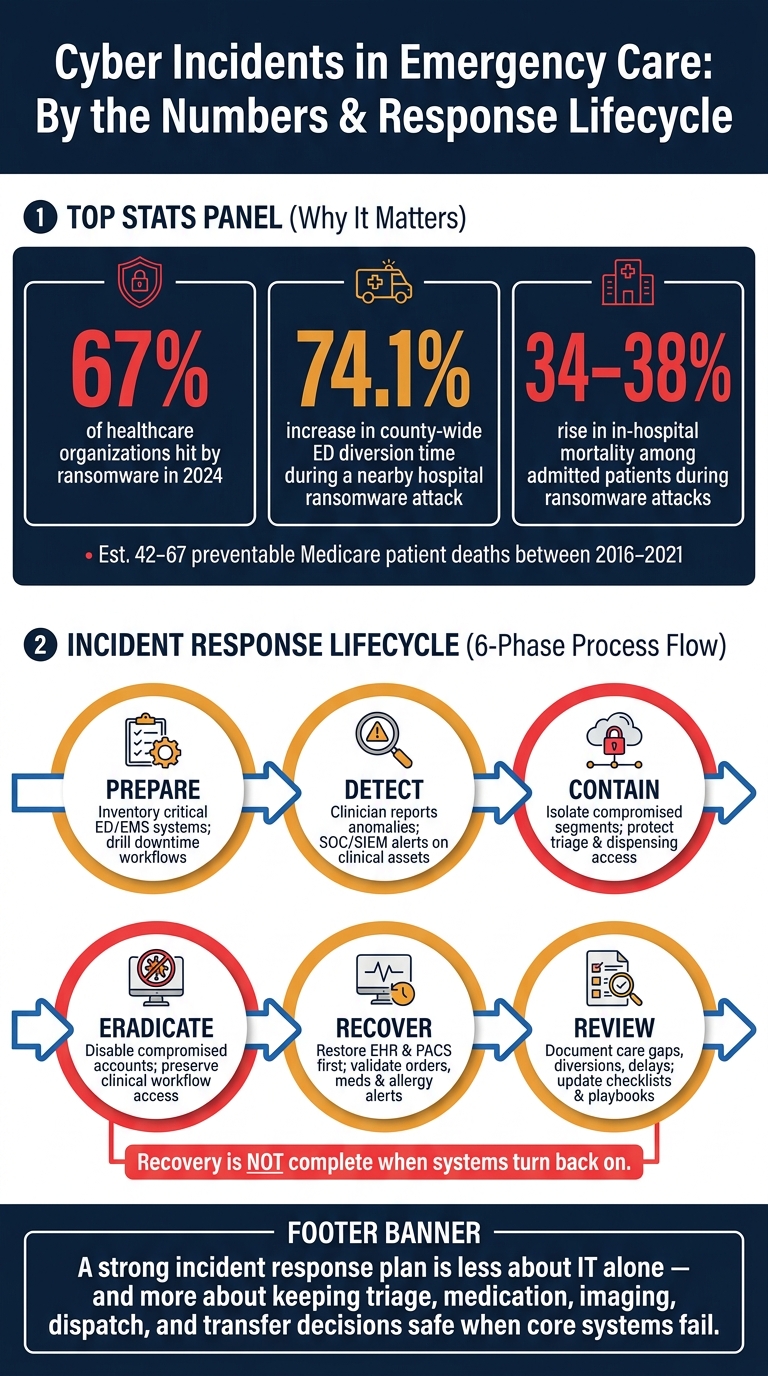
Cyber Attacks on Emergency Care: Patient Safety Stats & Response Lifecycle
How to Build a HIPAA-Aligned Incident Response Plan for Emergency Care
Once you know the main incident types and how they can hit operations, the next move is simple: build the plan before a cyber event slows down care. Under HIPAA's Security Rule, covered entities must maintain contingency plans that include a data backup plan, disaster recovery plan, emergency mode operation plan, and testing and revision procedures.[5][7]
For emergency care, that can't live as a policy sitting in a binder. It needs to work in the middle of pressure, noise, and time-critical decisions. Downtime procedures have to protect patient safety when every minute counts.
Define Roles, Command Structure, and Escalation Paths
Everyone on the response team needs a clear job before an incident begins. That means naming an Incident Commander, along with leads for IT/security, ED, EMS, compliance/privacy, legal, communications, and executive leadership. It also means spelling out who can approve containment steps, manual workarounds, diversion, and outside notifications.
Use the same hospital incident command structure already used for mass casualty events and utility failures. That keeps the cyber response tied to clinical operations instead of running on a separate lane while care teams make their own calls.
Escalation paths should be based on both time and impact. If EHR access goes down, lab results are delayed, PACS is unavailable, or medication verification fails, those conditions should trigger escalation up the chain.[8][12] The plan should also state when diversion or regional coordination needs to be on the table.
Those assigned roles should also own the paper and manual workflows used during an outage. If no one owns them, they tend to fall apart when people need them most.
Build Downtime Playbooks for Critical Emergency Systems
Build downtime playbooks for the EHR, lab, imaging, pharmacy, medical devices, EMS dispatch, ePCR, and communication tools. Each one should answer the same set of questions:
- What manual process replaces the system?
- Who approves that process?
- How is identity verified?
- How are orders and results matched after recovery?
Keep the focus on ED and EMS continuity. Diversion decisions, manual medication verification, and transfer coordination all need defined steps. This is where vague language causes trouble. People need to know exactly what to do.
Plan for outages lasting 4 weeks or longer.[9][11] That changes the scale of the playbooks. A pharmacy playbook, for example, should cover manual verification steps for high-risk medications, not just a short outage fix. An imaging playbook should explain how orders and results are tracked when PACS is down for days, not hours. Backup phones, radios, and printed call trees should be on hand for every shift.
Every workaround should feed the incident record.
Document Events, Evidence, and Regulatory Actions
Documentation should start the moment an incident is identified. Treat the incident record as both a patient-safety tool and a HIPAA compliance record. The response team should document who made each decision, when downtime was activated, which time-sensitive workflows were affected, and how patient safety risks were handled.
Keep one incident file for the full record, including the timeline, affected assets, indicators of compromise, containment, recovery, and communications.[4][6]
Evidence preservation also matters for patient safety and compliance. If ePHI may have been involved, HIPAA breach risk assessment requires documentation of the nature and extent of the information, whether it was actually acquired or viewed, and what mitigation steps were taken.[2][3] Logs, screenshots, access records, and configuration or backup details can support breach analysis. At the same time, collection methods should not pull staff away from active care.
sbb-itb-535baee
The Incident Response Lifecycle Applied to Emergency Care Cyber Events
Once the plan and playbooks are set, the response needs to move through a clear lifecycle. NIST lays this out as preparation, detection, containment, eradication, recovery, and post-incident review. In emergency care, that framework fits cleanly because each phase touches patient safety.
This isn't just an IT problem. In the ED, ransomware is a clinical emergency. Each phase should be judged by one plain standard: can triage, imaging, medication, and diversion still run safely?
That standard matters. Research found that in-hospital mortality among already-admitted patients rose by 34–38% during ransomware attacks, with estimates of 42–67 preventable Medicare patient deaths between 2016 and 2021.[14][13]
Preparation and Detection in High-Acuity Environments
Preparation starts with a live inventory of systems that emergency care depends on. That includes the EHR, PACS, lab interfaces, telemetry, infusion pumps, CAD, dispatch, ePCR, paging, radio, and networked medical devices.
For each asset, document:
- the owner
- the network segment
- the data type
- how long the system can be down before patient safety is at risk
In some cases, the answer is brutally short. For resuscitation-room telemetry, tolerance may be measured in minutes.
Quarterly tabletop exercises help turn a written plan into something people can use under pressure. Run them for ransomware attacks against healthcare delivery organizations, radio loss, and PACS outages, and include ED, EMS, IT, compliance, and communications. Don't just talk through the scenario. Push on diversion, medication, and paper-triage workflows before a real event exposes weak spots.
Detection has to work from both ends: machine monitoring and frontline reporting. SOC and SIEM alerts should be tuned for ED- and EMS-critical assets. That means flagging things like unusual logins on dispensing systems, EHR latency, or unknown devices showing up on clinical network segments.
At the same time, staff at the bedside need one escalation path they can use fast, without stepping away from a patient. Clinicians should know the warning signs - unexpected logouts, missing orders, or wrong patient data - and report them at once while starting downtime procedures.
Containment and Eradication Without Stopping Emergency Services
When a cyber incident is confirmed, containment can't be handled as a network-only exercise. The goal is to protect care while limiting spread.
Before any major containment move, the joint command team should check the current ED census, patient acuity, and EMS inbound volume. That pause matters because diversion carries its own patient safety risk, especially when nearby EDs are already full.[1][19]
The 2021 Scripps Health ransomware attack shows what that can look like in practice. The incident lasted nearly four weeks, forced diversion for stroke, heart attack, and trauma patients, and pushed nearby EMS arrivals up by nearly 60% in week 1.[15][16][17][18][20][21]
Containment works best when it's segmented and stepwise. Isolate compromised endpoints and network segments, but protect the systems tied to triage, diagnostics, and ambulance coordination. If ED devices have to be pulled offline, spare workstations should be ready to swap in. Compromised accounts should be disabled, but emergency override access for clinical staff in resuscitation areas needs to stay available. Every exception should be logged for later review.
Recovery, Validation, and After-Action Improvement
Recovery should start with clinical systems, not back-office tools. Bring back the ED EHR, PACS, and EMS CAD before administrative platforms. Restore from immutable backups into a segmented environment, verify data integrity, and only then reconnect systems.
Credential work needs to happen in parallel. Reset passwords, re-enroll multi-factor authentication, and rebuild role-based access from predefined access lists so ED attendings and EMS supervisors can regain the permissions they need without delay.
Before anything returns to production, clinicians should run structured validation tests. They should place test lab and imaging orders, check that routing and result display work, confirm patient tracking and triage functions, and verify that medication records and allergy alerts are right.
That step can't be rushed. After a cyber event, missing orders or mislinked patients can lead to serious clinical harm.
Even after systems are back, monitoring should stay elevated on restored assets. Watch for odd authentication patterns or configuration changes that may point to a leftover threat.
The after-action review should look past the technical root cause alone. It should also examine care impact, including delayed procedures, diverted ambulances, and missed time-sensitive interventions. Then use those findings to update checklists, downtime steps, and training. Those lessons should feed the checklists and tables that follow.
Checklists, Tables, and Risk Data to Strengthen Response Readiness
After-action findings should turn into tools people can actually use when things get messy. In emergency care, that usually means downtime checklists, quick-start cards, and role-based tables that staff can grab fast during a system outage or cyber incident. The key is simple: test these tools in drills first, then rely on them in live events.
Checklists for ED, EMS, and Diversion Decisions
Federal ASPR TRACIE materials include dedicated Hospital Downtime Preparedness and Downtime Operations checklists, which shows how cyber incidents and IT outages now sit at the center of emergency preparedness work.[22][10][28] That means every ED and EMS agency should keep department-specific downtime kits ready, with paper forms, manual medication worksheets, triage tools, and quick-start cards.
For the ED, the checklist should cover the parts of care most likely to slow down first: triage, registration, diagnostics, medications, communication, and diversion thresholds.
- Triage: Paper forms, manual acuity scoring, backup patient tracking board
- Registration: Manual demographic capture, identity verification, process for later data entry
- Diagnostics: Paper lab and imaging requisitions, verbal read-back for critical results
- Medications: Printed downtime MARs, independent double-checks, pharmacy phone verification for allergy checks
- Communication: Overhead paging, runner system, landline call trees, secure radio channels
- Diversion thresholds: Documented criteria for pausing new arrivals, notifying EMS, and informing regional coordination centers
EMS checklists should cover backup dispatch, alternate routing, paper PCRs, and a structured hospital handoff over radio or a dedicated phone line.
Diversion checklists should be built around clinical risk, operating capacity, and regulatory duties. Decision points need time limits, with reassessment every 30 to 60 minutes, and named roles such as ED charge nurse, EMS supervisor, and administrator-on-call so no one is left guessing.[8][24][26] Even during diversion, EMTALA obligations still apply, so the checklist should include a prompt confirming that appropriate medical screening exams are still being provided.
Tables to Improve Clarity and Execution
Checklists help teams act. Tables help them compare, sort, and assign work fast. These four tables turn planning into tools that can be used in drills, built around the prepare, detect, contain, and recover phases emergency care teams have to move through under pressure.
Table 1: Incident Types vs. Emergency Care Impact
| Incident Type | Triage Impact | Diagnostics Impact | Medication Impact | EMS/Coordination Impact |
|---|---|---|---|---|
| Ransomware on EHR | Paper tracking board; manual acuity scoring | Paper orders; verbal result read-back | Downtime MARs; pharmacy phone verification | Diversion notification to regional EMS; manual handoff forms |
| Radiology PACS outage | Minimal direct impact | Delayed imaging for trauma, stroke, STEMI | Minimal direct impact | Surgeon and neurologist notification via phone |
| EMS dispatch system failure | Variable arrival patterns; no advance notice | Minimal direct impact | Minimal direct impact | Radio-based dispatch; manual call logging; pre-mapped routes |
| Lab information system failure | Acuity decisions delayed without labs | Manual requisitions; runner to lab; verbal critical results | Dosing decisions delayed for renally-cleared drugs | Notify receiving ED of documentation gap |
| Secure messaging platform loss | Communication delays between care teams | Delayed critical result routing | Delayed pharmacy consults | Overhead paging and runner system activated |
Table 2: Response Phases vs. Emergency Workflows
| NIST Phase | ED Workflow | EMS Workflow |
|---|---|---|
| Preparation | Drill downtime registration, triage, and medication workflows | Test radio dispatch, paper PCRs, and alternate routing |
| Detection | Clinician reports EHR latency or missing orders; downtime procedures activated | Dispatcher flags CAD anomalies; radio backup activated |
| Containment | Isolate compromised systems; protect triage and dispensing access | Shift to radio dispatch; manual logging of unit assignments |
| Eradication | Disable compromised accounts; preserve access to critical clinical workflows | Rebuild dispatch system access; verify routing data integrity |
| Recovery | Restore EHR and PACS first; validate lab routing and medication records before go-live | Restore CAD; verify ePCR sync and hospital notification functions |
| Post-Incident Review | Document delayed procedures, diversion duration, and near-misses | Review field documentation gaps and handoff quality |
Table 3: Critical Systems vs. Downtime Procedures
| System | Downtime Action | Fallback Process |
|---|---|---|
| EHR | Activate downtime packet; paper charts | Pre-printed registration and order forms |
| Radiology PACS | Route urgent reads to on-call radiologist by phone | Local image storage; fax requisitions |
| Lab information system | Paper requisitions; runner to lab | Verbal critical result read-back with documentation |
| Medication dispensing cabinets | Override access for emergency meds; paper MARs | Independent double-check; pharmacy phone verification |
| EMS dispatch / CAD | Radio-based dispatch scripts | Manual call log; pre-mapped alternate routes |
| ePCR | Paper PCRs with standardized vital signs and intervention fields | Later data entry at receiving hospital |
Table 4: Incident Roles vs. Responsibilities
| Role | Preparation | Detection/Containment | Recovery | Post-Incident |
|---|---|---|---|---|
| ED Medical Director | Approve checklists; lead tabletops | Authorize diversion; clinical safety decisions | Validate clinical workflows before go-live | Lead after-action clinical review |
| ED Charge Nurse | Maintain downtime kits; train staff | Activate downtime procedures; coordinate runners | Confirm medication and triage workflows | Document care gaps and near-misses |
| EMS Chief | Test radio and paper PCR workflows | Shift to manual dispatch; notify receiving hospitals | Restore CAD; verify ePCR integrity | Review field documentation quality |
| IT Incident Commander | Inventory critical systems; test backups | Isolate compromised segments; protect clinical access | Restore systems in clinical priority order | Root cause analysis; update playbooks |
| Privacy Officer | Confirm breach notification thresholds | Document PHI exposure scope | Verify data integrity post-restoration | File regulatory notifications if required |
| Communications Lead | Prepare external notification templates | Notify regional EMS and neighboring hospitals | Confirm all-clear communications | Coordinate media and regulatory messaging |
These tables are most useful when they live where staff will look for them: printed in downtime kits, used as drill scorecards during tabletop exercises, and revised after each live event or exercise.
To make them measurable, add readiness data points right into the tables. That can include ED door-to-provider time, imaging and lab turnaround, medication delays, ambulance turnaround time, EMS response intervals, diversion duration, the number of systems offline or degraded, and the share of critical workflows with tested downtime procedures in the past 12 months. With that data in place, leaders can compare incidents the same way each time and spot repeat weak points.[23][25][27]
How Censinet Supports Emergency Care Incident Response Planning
Keeping these tools current depends on having accurate vendor and system risk data. Censinet RiskOps™ serves as a single source of truth for third-party vendor risk management and enterprise cyber risk data that affects ED and EMS readiness. By pulling together assessments of clinical applications, medical devices, EMS-related vendors such as dispatch platforms and ePCR systems, and systems that store or transmit PHI, the platform gives leaders a clear view of which incident types are most likely and which systems matter most to emergency workflows. RiskOps also connects each vendor and system to specific downtime procedures and incident response playbooks, so ED and EMS leaders can check whether a high-risk vendor supporting dispatch has tested fallback procedures reflected in current checklists.
Censinet AI™ helps keep that material from getting outdated. When a new vendor is added for an ED tracking system or EMS dispatch platform, AI-driven analysis flags dependencies, known vulnerabilities, and criticality levels, which prompts the incident response team to update the related table entries. As new threats are identified, Censinet AI can suggest checklist additions, such as new containment steps or updated testing frequency for fallback tools, and send high-risk findings to the ED director, EMS chief, and CISO for playbook review. It can also surface skipped or confusing steps so training focuses on the weakest points.
Conclusion: What a Strong Emergency Care Incident Response Program Looks Like
A strong emergency care incident response program protects patients when systems go down. It brings together a clear command structure, tested downtime workflows, disciplined response steps, evidence preservation, and recovery checks before forensics are finished or full system restoration begins. These parts need to work together. Governance supports fast decisions, downtime planning keeps care moving, lifecycle discipline helps teams avoid turning containment into a clinical problem, and recovery validation confirms systems are clinically safe, not just back online.
Those basics matter because cyber events already put measurable pressure on patient safety. The risk doesn’t go away, and the operational impact hits right away.
The strongest programs drill downtime procedures, assign named decision-makers, and validate recovery before returning to normal patient volume. That kind of discipline works best when teams keep risk data up to date. Censinet RiskOps™ supports readiness with third-party and enterprise risk assessments, benchmarking, and collaborative risk workflows across patient data, PHI, clinical applications, medical device security risks, and supply chain risk. Emergency care preparedness is continuous.
FAQs
What should be restored first after an ED cyber incident?
Restore systems based on clinical need, not business convenience, to protect patient safety.
Start with identity and access infrastructure, especially Active Directory and single sign-on (SSO). If staff can’t log in, they can’t do much of anything. It’s the front door to the rest of the stack.
Next, bring back core EHR and medication administration modules. After that, restore clinical communication tools and diagnostic systems like laboratory information systems and PACS. This order keeps care moving and helps teams get the data they need when time matters.
Leave billing and scheduling for later. Bring those back only after clinical services are fully operational and safety-validated.
How often should emergency care downtime plans be tested?
Healthcare organizations should run dedicated downtime drills quarterly. That gives teams regular practice for the moments when systems go down and pressure spikes.
Broader incident response plans and tabletop exercises should be tested at least twice a year. The goal is simple: make sure people can carry out their roles when the heat is on.
For better preparedness, add annual risk assessments. It also helps to run ad hoc evaluations after major organizational changes or infrastructure upgrades.
When does a cyber outage become a HIPAA breach?
A cyber incident turns into a HIPAA breach when protected health information (PHI) is accessed, used, or disclosed without permission in a way that compromises its security or privacy. That’s the line between a general incident and a breach: once it crosses into breach territory, notification rules may apply.
With ransomware involving ePHI, the Office for Civil Rights generally treats the event as a breach. The only exception is when the organization documents a formal four-factor risk assessment showing a low probability that the information was compromised.
